ECE NUHOGLU


50+ Happy Clients
50+ Happy Clients
Hi, I'm Ece!
Hi, I'm Ece!
UX/UI Designer
HTML5/CSS3 Mastery
Product Design
Branding
Collaborative Team Player
UX/UI Designer
HTML5/CSS3 Mastery
Product Design
Branding
Collaborative Team Player





About Me
I’m a multidisciplinary designer focused on UI/UX, digital products, and visual systems. I enjoy turning complex ideas into clear, intuitive experiences, balancing aesthetics with usability. My work sits at the intersection of design, strategy, and technology.
I’m a multidisciplinary designer focused on UI/UX, digital products, and visual systems. I enjoy turning complex ideas into clear, intuitive experiences, balancing aesthetics with usability. My work sits at the intersection of design, strategy, and technology.
I’m a multidisciplinary designer focused on UI/UX, digital products, and visual systems. I enjoy turning complex ideas into clear, intuitive experiences, balancing aesthetics with usability. My work sits at the intersection of design, strategy, and technology.
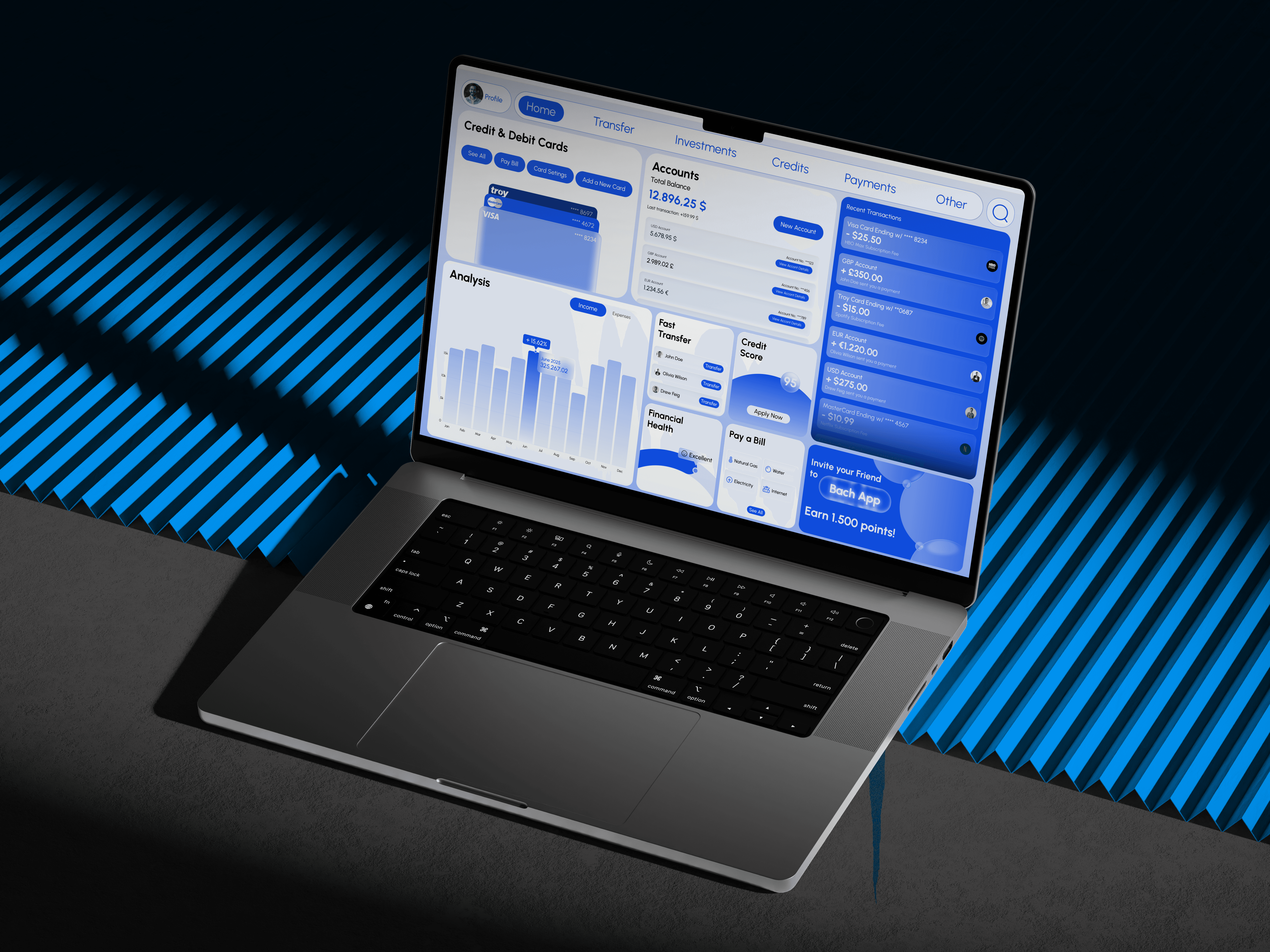
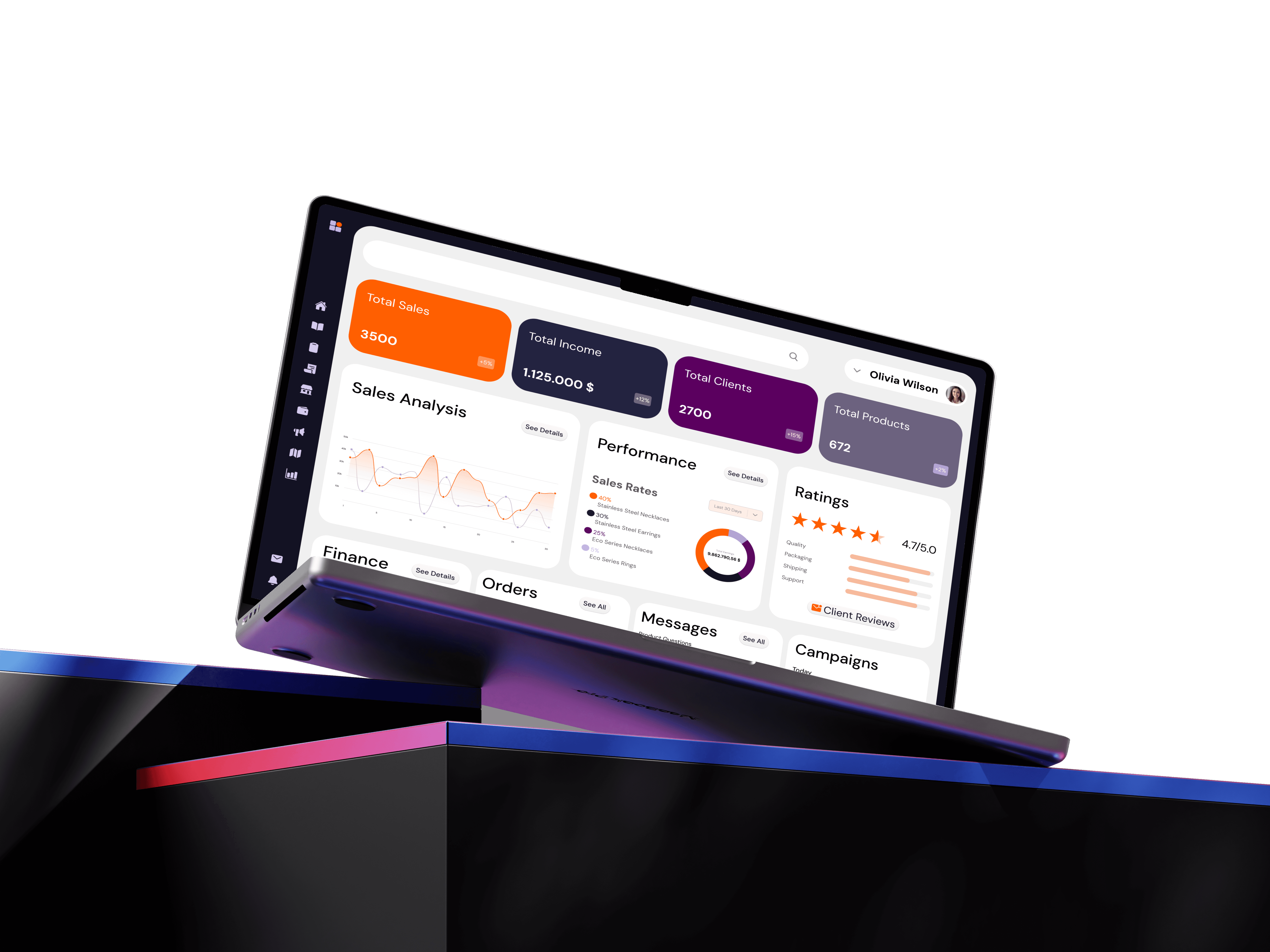
I design with intention — every layout, interaction, and detail serves a purpose. From dashboards to interactive interfaces, I approach projects with a strong sense of structure, motion, and clarity. I value thoughtful design systems, meaningful micro-interactions, and scalable solutions.
I design with intention — every layout, interaction, and detail serves a purpose. From dashboards to interactive interfaces, I approach projects with a strong sense of structure, motion, and clarity. I value thoughtful design systems, meaningful micro-interactions, and scalable solutions.
I design with intention — every layout, interaction, and detail serves a purpose. From dashboards to interactive interfaces, I approach projects with a strong sense of structure, motion, and clarity. I value thoughtful design systems, meaningful micro-interactions, and scalable solutions.
I’m continuously exploring new tools, 3D interactions, and creative workflows to push digital experiences further. My goal is to create work that feels modern, functional, and human — and to collaborate on products that make a real impact.
I’m continuously exploring new tools, 3D interactions, and creative workflows to push digital experiences further. My goal is to create work that feels modern, functional, and human — and to collaborate on products that make a real impact.
I’m continuously exploring new tools, 3D interactions, and creative workflows to push digital experiences further. My goal is to create work that feels modern, functional, and human — and to collaborate on products that make a real impact.
Projects
My Stack

Figma is my collaborative design platform of choice. I utilize it to work seamlessly with team members and clients, facilitating real-time feedback and design iterations. Its cloud-based approach streamlines the design process.
Figma
Figma is my collaborative design platform of choice. I utilize it to work seamlessly with team members and clients, facilitating real-time feedback and design iterations. Its cloud-based approach streamlines the design process.
Figma
Tap to flip
Figma is my collaborative design platform of choice. I utilize it to work seamlessly with team members and clients, facilitating real-time feedback and design iterations. Its cloud-based approach streamlines the design process.
Figma
Tap to flip
Framer revolutionizes my web design workflow. It goes beyond a simple website builder, offering a visual playground where I can craft stunning and interactive websites without getting bogged down in complex code.
Framer
Framer revolutionizes my web design workflow. It goes beyond a simple website builder, offering a visual playground where I can craft stunning and interactive websites without getting bogged down in complex code.
Framer
Tap to flip
Framer revolutionizes my web design workflow. It goes beyond a simple website builder, offering a visual playground where I can craft stunning and interactive websites without getting bogged down in complex code.
Framer
Tap to flip
Spline enables me to bring depth and interactivity into digital experiences. I use it to create real-time 3D elements that enhance storytelling and make interfaces more engaging and memorable.
Spline
Spline enables me to bring depth and interactivity into digital experiences. I use it to create real-time 3D elements that enhance storytelling and make interfaces more engaging and memorable.
Spline
Tap to flip
Spline enables me to bring depth and interactivity into digital experiences. I use it to create real-time 3D elements that enhance storytelling and make interfaces more engaging and memorable.
Spline
Tap to flip
Photoshop supports my visual design workflow through image editing, compositing, and visual refinement. I use it to enhance assets and create polished visuals that elevate the final product.
Adobe Photoshop
Photoshop supports my visual design workflow through image editing, compositing, and visual refinement. I use it to enhance assets and create polished visuals that elevate the final product.
Adobe Photoshop
Tap to flip
Photoshop supports my visual design workflow through image editing, compositing, and visual refinement. I use it to enhance assets and create polished visuals that elevate the final product.
Adobe Photoshop
Tap to flip
Illustrator is my go-to tool for vector-based design. From icons to illustrations and UI elements, it helps me create precise, scalable visuals that integrate seamlessly into digital interfaces.
Adobe Illustrator
Illustrator is my go-to tool for vector-based design. From icons to illustrations and UI elements, it helps me create precise, scalable visuals that integrate seamlessly into digital interfaces.
Adobe Illustrator
Tap to flip
Illustrator is my go-to tool for vector-based design. From icons to illustrations and UI elements, it helps me create precise, scalable visuals that integrate seamlessly into digital interfaces.
Adobe Illustrator
Tap to flip
InDesign allows me to structure and present content with strong visual hierarchy. I use it for layout-heavy designs, presentations, and editorial-style digital materials.

Adobe InDesign
InDesign allows me to structure and present content with strong visual hierarchy. I use it for layout-heavy designs, presentations, and editorial-style digital materials.
Adobe InDesign
Tap to flip
InDesign allows me to structure and present content with strong visual hierarchy. I use it for layout-heavy designs, presentations, and editorial-style digital materials.
Adobe InDesign
Tap to flip
After Effects helps me add motion and meaning to interfaces. I use it to design micro-interactions, transitions, and animations that improve usability and bring interfaces to life.

Adobe After Effects
After Effects helps me add motion and meaning to interfaces. I use it to design micro-interactions, transitions, and animations that improve usability and bring interfaces to life.
Adobe After Effects
Tap to flip
After Effects helps me add motion and meaning to interfaces. I use it to design micro-interactions, transitions, and animations that improve usability and bring interfaces to life.
Adobe After Effects
Tap to flip
Premiere Pro supports my workflow when video content is needed. I use it to edit and refine videos for presentations, case studies, and digital storytelling.

Adobe Premiere Pro
Premiere Pro supports my workflow when video content is needed. I use it to edit and refine videos for presentations, case studies, and digital storytelling.
Adobe Premiere Pro
Tap to flip
Premiere Pro supports my workflow when video content is needed. I use it to edit and refine videos for presentations, case studies, and digital storytelling.
Adobe Premiere Pro
Tap to flip
Affinity provides a lightweight and flexible alternative for graphic design tasks. I use it for fast visual work when efficiency and simplicity are key.

Affinity
Affinity provides a lightweight and flexible alternative for graphic design tasks. I use it for fast visual work when efficiency and simplicity are key.
Affinity
Tap to flip
Affinity provides a lightweight and flexible alternative for graphic design tasks. I use it for fast visual work when efficiency and simplicity are key.
Affinity
Tap to flip
Notion helps me keep my projects organized. I use it for project management, task tracking, and as a central hub for documentation, ensuring that everything from design notes to project timelines is in one place.
Notion
Notion helps me keep my projects organized. I use it for project management, task tracking, and as a central hub for documentation, ensuring that everything from design notes to project timelines is in one place.
Notion
Tap to flip
Notion helps me keep my projects organized. I use it for project management, task tracking, and as a central hub for documentation, ensuring that everything from design notes to project timelines is in one place.
Notion
Tap to flip
Slack is the cornerstone of my collaborative workflow. It fosters a dynamic environment where teams can seamlessly exchange ideas, share files, and provide real-time feedback.

Slack
Slack is the cornerstone of my collaborative workflow. It fosters a dynamic environment where teams can seamlessly exchange ideas, share files, and provide real-time feedback.
Slack
Tap to flip
Slack is the cornerstone of my collaborative workflow. It fosters a dynamic environment where teams can seamlessly exchange ideas, share files, and provide real-time feedback.
Slack
Tap to flip
Jira helps me stay aligned with product teams and development workflows. I use it to track tasks, understand technical constraints, and design within real product timelines.

Jira
Jira helps me stay aligned with product teams and development workflows. I use it to track tasks, understand technical constraints, and design within real product timelines.
Jira
Tap to flip
Jira helps me stay aligned with product teams and development workflows. I use it to track tasks, understand technical constraints, and design within real product timelines.
Jira
Tap to flip
Services
01
UX/UI Product Design
01
UX/UI Product Design
01
UX/UI Product Design
01
UX/UI Product Design
I design user-centered digital products that balance usability, aesthetics, and business goals. From concept to final interface, every decision is made with clarity and purpose.

I design scalable SaaS platforms and dashboards that make complex data easy to understand. Clear layouts, strong information hierarchy, and system thinking guide every design.
02
SaaS & Dashboard Design
02
SaaS & Dashboard Design
I craft secure, trustworthy, and accessible FinTech experiences. Thoughtful UX flows and clear visual language help users navigate complex financial products with confidence.

03
Fintech Interface Design
03
Fintech Interface Design
I design immersive landing pages using motion, interaction, and 3D elements. These experiences are built to engage users, tell a story, and create a strong first impression.
